.png)

Timeout Settings
- 03 Dec 2025
- 1 Minute to read
- Print
- DarkLight
- PDF
Timeout Settings
- Updated on 03 Dec 2025
- 1 Minute to read
- Print
- DarkLight
- PDF
Article summary
Did you find this summary helpful?
Thank you for your feedback!
Agent Disconnect
Overview
Agents may leave a session at any time by closing the browser tab. This does not end the session unless the agent explicitly selects End Session.
If no agents are viewing the session for 20 minutes, the session will automatically time out and close.
End-User Disconnect
Overview
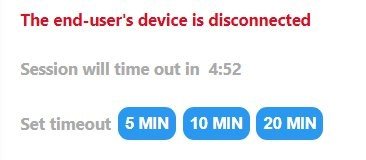
If the end user disconnects unexpectedly—for example, due to network loss, system reboot, or application crash—the session remains active for ten minutes to allow reconnection.
If the user does not return within ten minutes, the session automatically times out and closes.
Extending the Timeout Window
Agents can extend the timeout period in increments of 5, 10, or 20 minutes using the controls in the lower-right corner of the toolbar.
Conclusion
These timeout behaviors help ensure session stability while allowing sufficient time for reconnection when interruptions occur.
Was this article helpful?