Knowledge Base supplies organization-authorized articles in both Ask and Agent. An organization can configure several sources, including several sources from the same provider. A source's scope, search trigger, trust level, and enablement all matter.
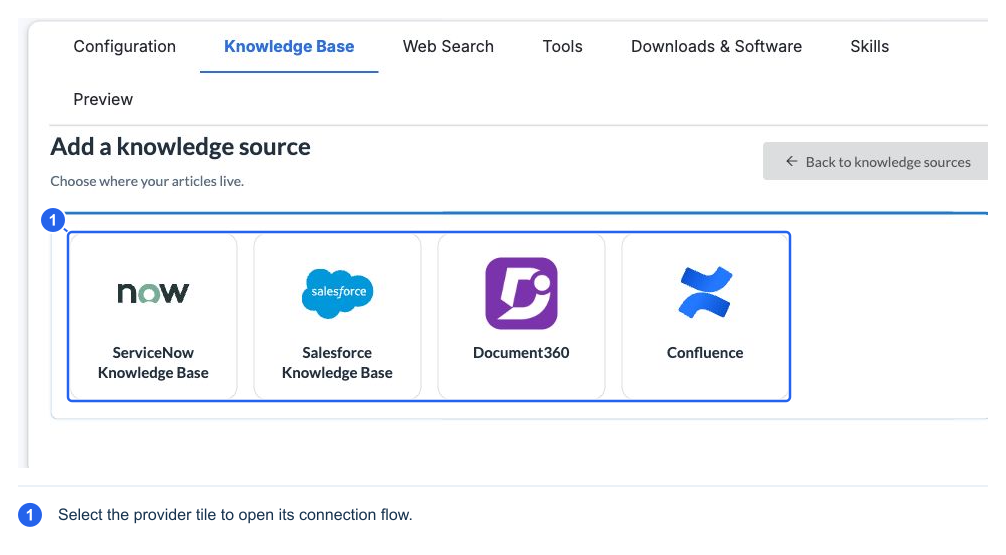
Connect a provider
- Open Knowledge Base → Add knowledge source.
- Choose the provider.
- Connect using an appropriate existing integration or authorized provider credentials, as the form offers.
- Select the knowledge scope and language where relevant.
- Give the source a recognizable Name and a clear Covers description.
- Review Advanced settings, including When to search, Trust level, and Articles per search.
- Run a Test search and inspect the returned article text/links.
- Save/create the source. New sources start off; enable the source separately when ready.
| Provider | Connection and scope to prepare |
|---|---|
| ServiceNow Knowledge Base | An eligible existing ServiceNow integration, or instance URL with OAuth client credentials and any configured scopes; choose the accessible knowledge base(s) and article-link/portal options offered by the connection |
| Salesforce Knowledge Base | An eligible existing integration, or the Salesforce instance and OAuth client/consumer credentials; connect to Lightning Knowledge, then review record type, language, and publication-channel scope |
| Document360 | A read-only API v3 key, beginning d360_sk_; connect, then choose project, workspace, and language. The connection reports its data center |
| Confluence | A Confluence Cloud site, Atlassian account email, and suitable API token; connect, then select spaces. The form provides the supported token-scope guidance |
The connection can offer reuse of credentials from another authorized source of the same provider. Stored secrets are encrypted and represented by a stored/masked indicator. Use Replace/connection controls for credential changes; do not paste credentials into AI chat, the Covers field, or a screenshot intended for distribution.
A connection can only return content its configured credentials and scope can access. A successful connection test does not prove that the intended articles are visible. Test a known relevant query and a query expected to return no results. If the source is missing expected articles, check provider permissions, selected knowledge base/space/project, publication status, channel, and language.
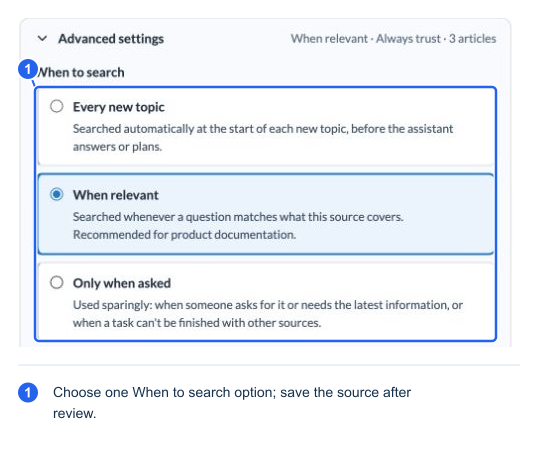
Choose when to search
| Trigger | Expected use |
|---|---|
| Every new topic | Searches automatically at the start of a relevant new topic, before the answer or plan; suitable for procedures that should routinely ground work |
| When relevant | Searches when the question matches the source's Covers/purpose; useful for focused product documentation |
| Only when asked | Used more selectively, including explicit requests, current-information needs, or when work cannot be completed from other sources |
“Only when asked” is a search preference, not an absolute “no network request unless this source's name is typed” privacy switch. Ask-mode retrieval and task-specific planning can request necessary information. Use source disablement when the assistant must not search a source.
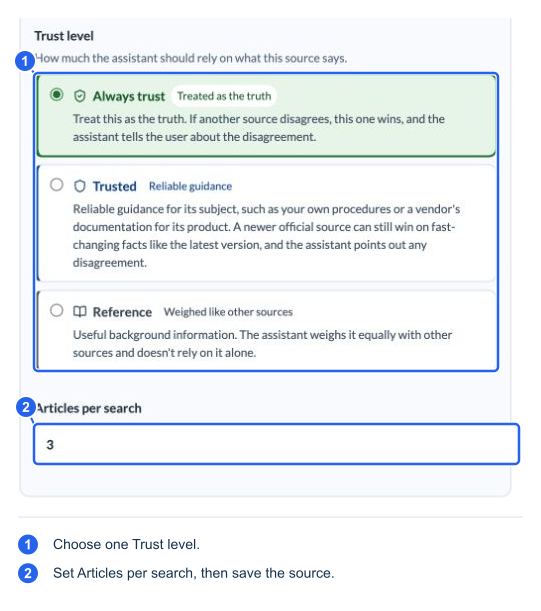
A follow-up on the same topic can reuse prior evidence rather than search again. A new topic or an explicit gap can trigger more retrieval. Article results are bounded: Articles per search accepts 1–10, commonly 3. Increasing it can provide more context but also more irrelevant content and processing.
Choose how to weigh an article
| Trust level | Interpretation |
|---|---|
| Always trust | Treat as authoritative when sources conflict; report the disagreement. Use only for an organization-controlled source that deserves this authority |
| Trusted | Reliable guidance for its subject; a newer official source may take precedence on changing facts such as current versions |
| Reference | Useful background weighed alongside other sources |
| Unverified | Available for web sources, not an organization KB trust choice; treated cautiously and cited |
Trust affects information weighting. It does not turn article instructions into authorization, bypass safety checks, or override verified device observations.
Test and inspect retrieval
Test search performs a real provider search without using the AI model to compose a support answer. It does not save your settings or publish a result to a customer. A disabled saved source can still be tested deliberately by its administrator.
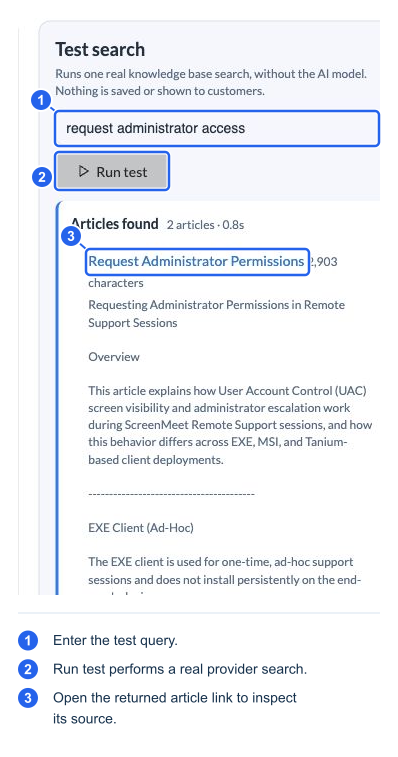
The captured Document360 search returned two articles. The result count and 0.8-second duration belong to this query and environment.
During a conversation, the status area can show which knowledge source is being searched or read. The final answer's sources chip groups KB articles by source and exposes queries and links. Consult the linked article when a procedure depends on a detail, and use explainability to trace retrieval problems.
A failed source/catalog load is different from a successful search with zero articles. The assistant should indicate unavailable knowledge rather than fabricate article content. Disabled, removed, or changed source versions stop their old cached passages from acting as current source evidence; an old transcript can still contain what was previously said.
Removing a source deletes its stored connection/credentials and stops searching it. Disable it first if you only want to suspend retrieval.