Attach an image
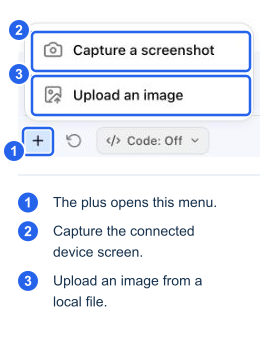
If Images and Screenshots is enabled, use the + control (Add screenshot or image file) to capture the remote screen or upload an image. You can also paste or drag a supported image into chat. Supported uploads are JPEG, PNG, and WebP. In this build, keep the original upload below 15 MiB (about 15.7 MB); the UI's 20 MB size message refers to the larger encoded payload limit.
Review the preview chip before sending; remove an unwanted attachment with Remove image. For an error dialog, leave the message visible and ask a specific question such as “What does this error mean, and which read-only checks would help?”
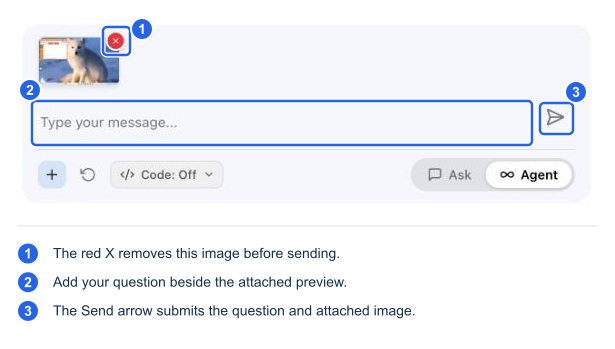
The image is processed by the configured vision/model route to create a text description for later reasoning. Do not assume that sensitive pixels are removed before this processing or that a generated description cannot include visible personal or operational details. Check the screen before capturing and follow your organization's data-handling requirements. Subsequent text reasoning from an image description is not proof that the underlying device state was verified by a tool.
Run code displayed in a chat answer
Prerequisite: code generation must be enabled for the organization. An administrator must turn on Configuration → Agent Config → Allow AI-generated scripts and save it before creating the support session. Without this allowance, the code-block Execute feature is unavailable.
When that organization setting is enabled and the session has the necessary capabilities, supported code blocks can offer Execute. Selecting it binds that block as written. It does not ask the agent to rewrite it into a different command.
Review the Code from chat card and its source. In a review-required session, use Run script to authorize it or Don't run to decline. Check the role and expected effect as carefully as you would for an AI-generated script. Unsupported or blocked code is refused rather than silently rewritten.
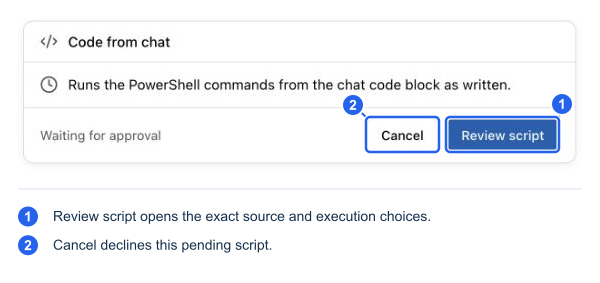
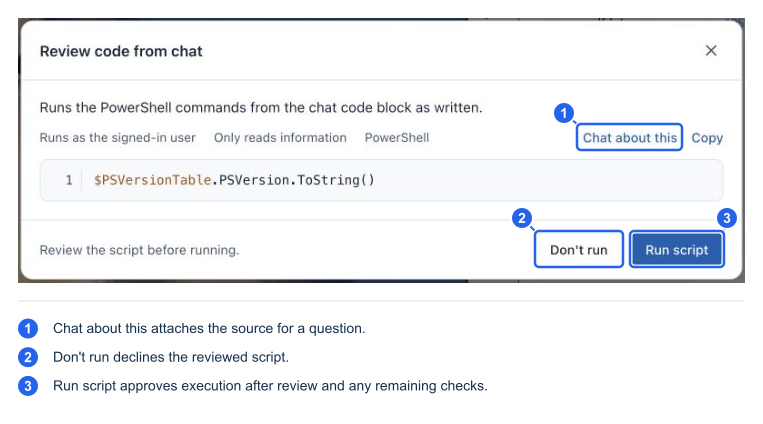
The captured example was declined after review. Its literal command was not dispatched.
The session's Code: Off setting turns off the agent's automatic generation of scripts. It does not turn off the organization's Allow AI-generated scripts allowance: an explicit Execute action on a code block can still be available while that allowance is enabled. This distinction matters when checking whether a session can run a literal command supplied in chat.
Keep evidence with its actual source
A screenshot, a KB article, and a website are useful context. They do not authorize execution or become a verified measurement merely because the agent quotes them. Ask the agent to distinguish what the user reported, what an article recommends, and what a device tool actually observed.