AI Assist (chat)
| Setting | Default | Effect |
|---|---|---|
| AI Assist | Off | Makes AI Assist available in support sessions when entitled |
| Images and Screenshots | On | Allows the supported image attachment and capture workflows; the AI Assist feature itself still needs to be enabled |
| AI Assist Activity in Session Logs | Off | Writes AI Assist activity into session event logs for tracking/auditing; this is separate from explainability artifact creation |
| Incident and Case Data | On where the integration exposes it | Supplies supported CRM incident/case title, description, notes, and history to improve context; the visible setting is integration-dependent |
Case context is acquired once for an AI conversation. Changes to the CRM record after that acquisition are not a continuous live feed. Ask and Agent share the acquired context. Starting a new conversation resets the working context; it does not remove the external case record or change saved retention policy.
Agent Config
| Setting | Default | Effect |
|---|---|---|
| Enable AI Agent | Off | Exposes Agent capability for entitled, compatible sessions; connection and Remote Control are still required |
| Behavior Prompt | Empty | Adds organization instructions in Ask and Agent, such as terminology, response style, and escalation procedures |
| Tool Execution | Read-only auto; other levels require review | Defines approval behavior by declared risk level; see section 10 |
| Allow AI-generated scripts | Off | Lets technicians choose generation for a session and use eligible code-block Execute actions |
| Allow running AI-generated scripts without approval | Off | Allows technicians to select the session's auto-run mode; it does not select that mode for them |
| Explainability JSON Logs | On | Creates structured explainability artifacts for the session |
| Explainability HTML Logs | On | Creates a self-viewable HTML explainability artifact |
Use the Behavior Prompt for stable operating guidance. For example:
Explain findings to a first-line support engineer. Start with available read-only checks. State what evidence supports each conclusion. If a change could interrupt the user, explain its impact before proposing it.
Behavior instructions guide the model's choices and wording. They do not enable a disabled tool, waive consent, create administrator access, or override deterministic installation policy. A reusable troubleshooting procedure belongs in a skill; a runnable organization script belongs in a custom tool.
Model provider
Where available, AI Model Provider offers OpenAI (direct) and OpenAI (Bedrock). Only ScreenMeet administrators can change this setting. It changes the route for AI Assist/Agent model requests and related retrieval embeddings; the application chooses the models used for particular tasks.
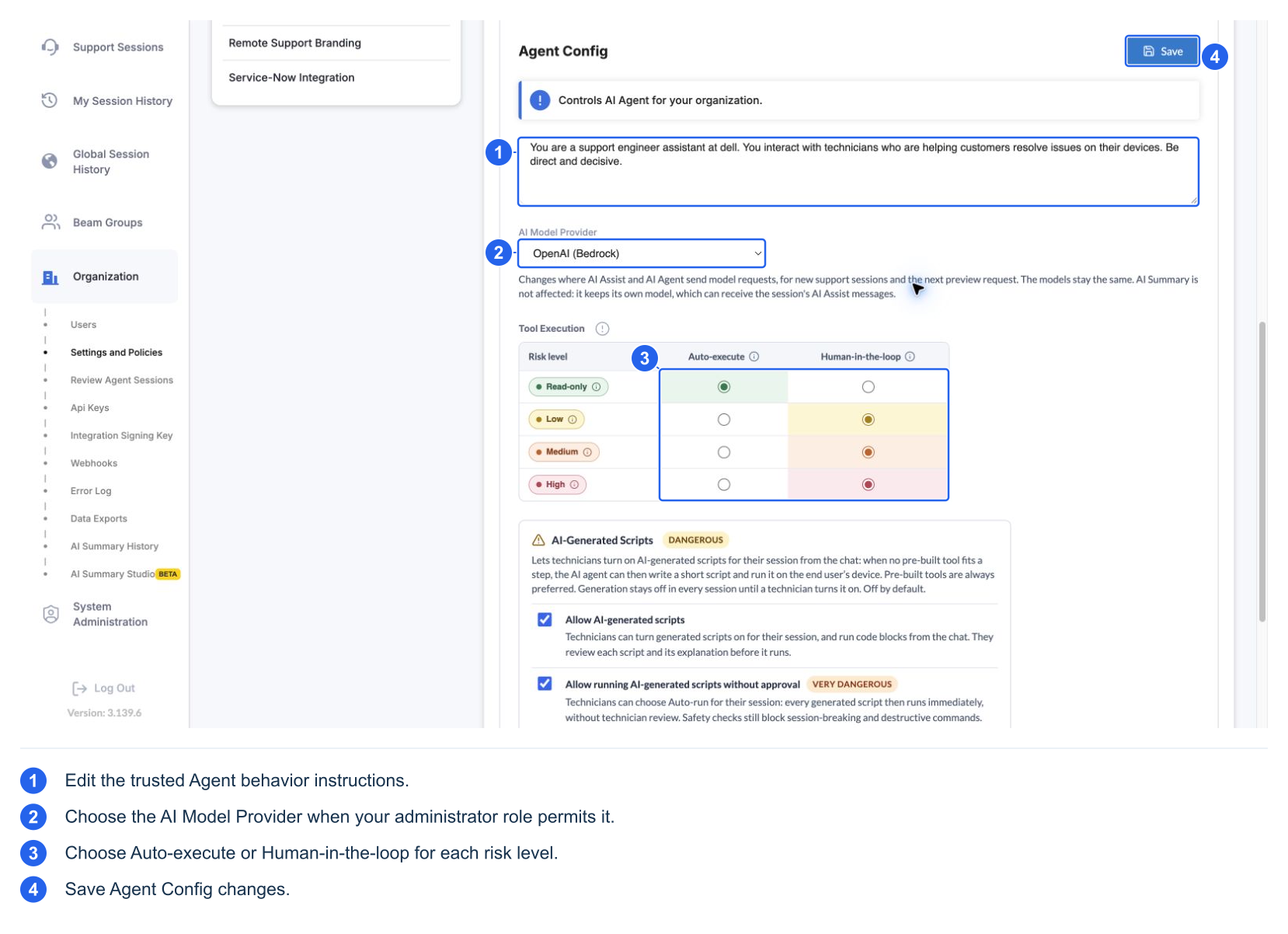
Bedrock-routed Harness requests do not fall back to the direct OpenAI API if Bedrock fails. A provider error should be investigated as an error, rather than assumed to have switched providers. Global inference routing and hosted web search can use different Bedrock routes; this selector is not a promise that all processing stays in one AWS Region.
AI Summary has its own provider/model behavior. Changing this selector does not change AI Summary, whose inputs can include the session's AI Assist messages. Use your deployment's data-processing and retention documentation for contractual statements; this UI selector alone does not establish a retention guarantee.
Some integrations can use an end-user audience rather than a technician audience. That changes how the agent addresses the requester. It does not change tool availability, privilege, or approval rules, and is an integration setting rather than a control shown in these configuration screenshots.