A skill is a reusable procedure that tells the agent how to approach a class of problem. It can ask for facts, guide diagnostic ordering, interpret findings, and describe when to stop or ask the technician. It does not contain a new executable tool simply because the procedure mentions a command.
Harness matches a suitable enabled skill to the request, turns its procedure into work steps, and uses the normal planning, approval, and execution mechanisms. A procedure can continue across several turns and approval decisions. Available tools, managed-tool opt-in, privilege, and generated-code allowances still control what can run.
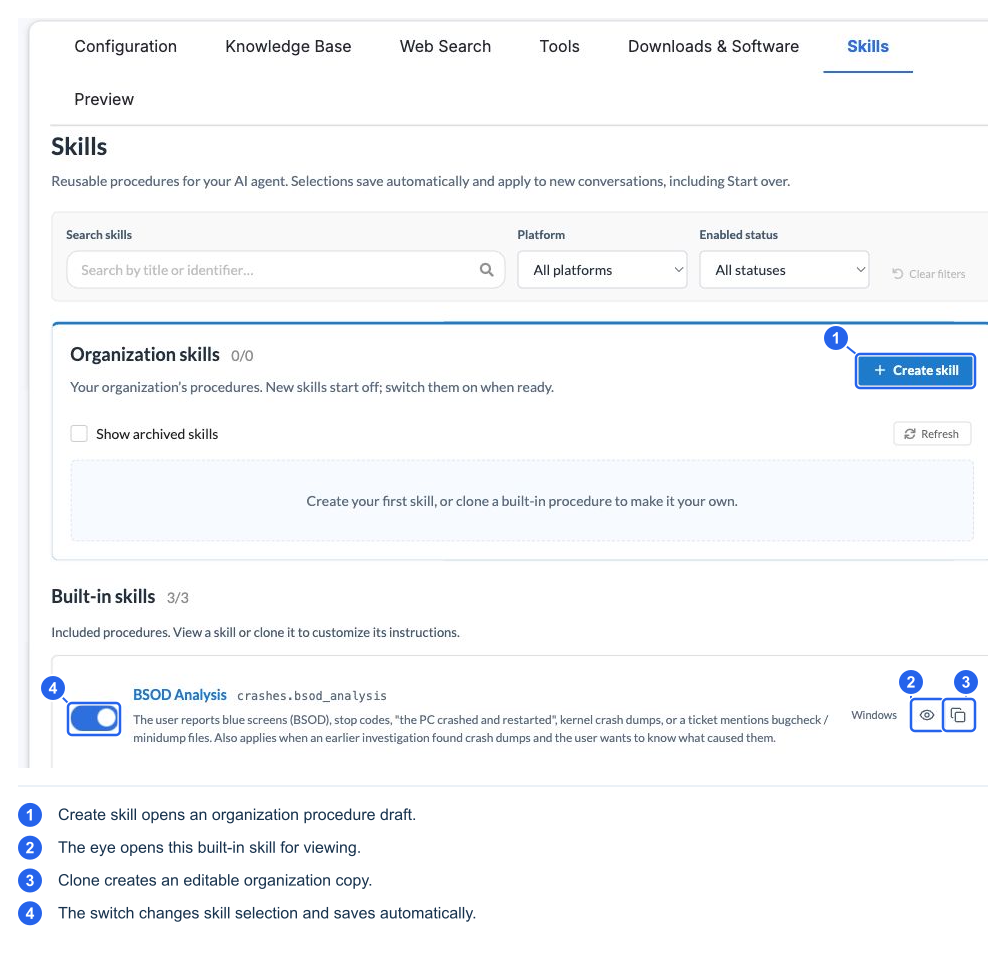
The example catalog includes BSOD Analysis, Sudden Shutdown Investigation, and Printer Troubleshooting. Availability can change by release and organization selection. You normally describe the symptom; you do not need to know or type a skill identifier.
Enable or customize a procedure
- Open Skills.
- Search or filter by platform and enabled status.
- View a built-in skill to understand its scope. Built-in procedures are read-only.
- Clone a built-in procedure to create an organization version, or select Create skill.
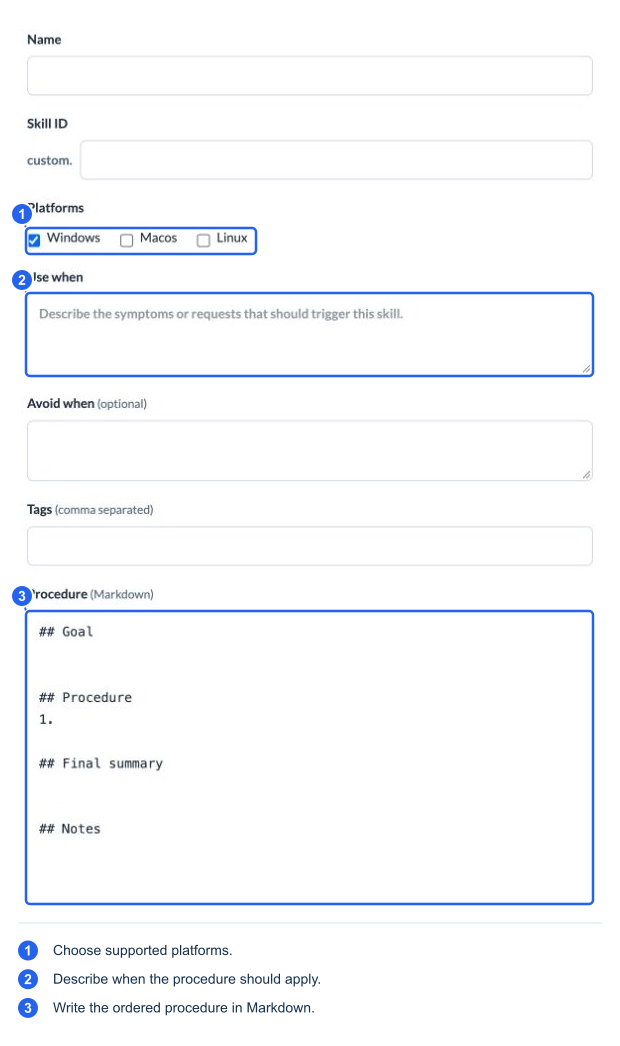
- Review or write the fields below, then Save skill.
- New organization skills start off. Enable the saved skill from the list when ready.
- Validate in a new conversation, including a deliberate Start over if appropriate.
| Field | Purpose |
|---|---|
| Name | A recognizable procedure name |
| Skill ID suffix | An organization identifier under custom.; supply it separately rather than assuming the AI proposal chose one |
| Platforms | Devices for which the procedure is appropriate; this does not create tool support on those platforms |
| Use when | Clear symptoms and requests that should trigger it |
| Avoid when | Exclusions or situations better handled another way |
| Tags | Comma-separated discovery hints |
| Procedure (Markdown) | Goal, ordered investigation, decision points, final summary, and limitations |
Skill selections save automatically; they do not wait for the Tools page's Save action. Changes apply to new conversations, including Start over. Disabling a skill removes that procedure from selection; it does not disable the underlying tools, which can still serve other requests.
Author a skill with AI
Use Author with AI to describe a procedure or paste existing notes. Review the suggestions beside each field. Accept or Reject fields individually, or use Accept all / Reject all. Accepted changes become draft content; Save skill persists them, and enablement remains separate.
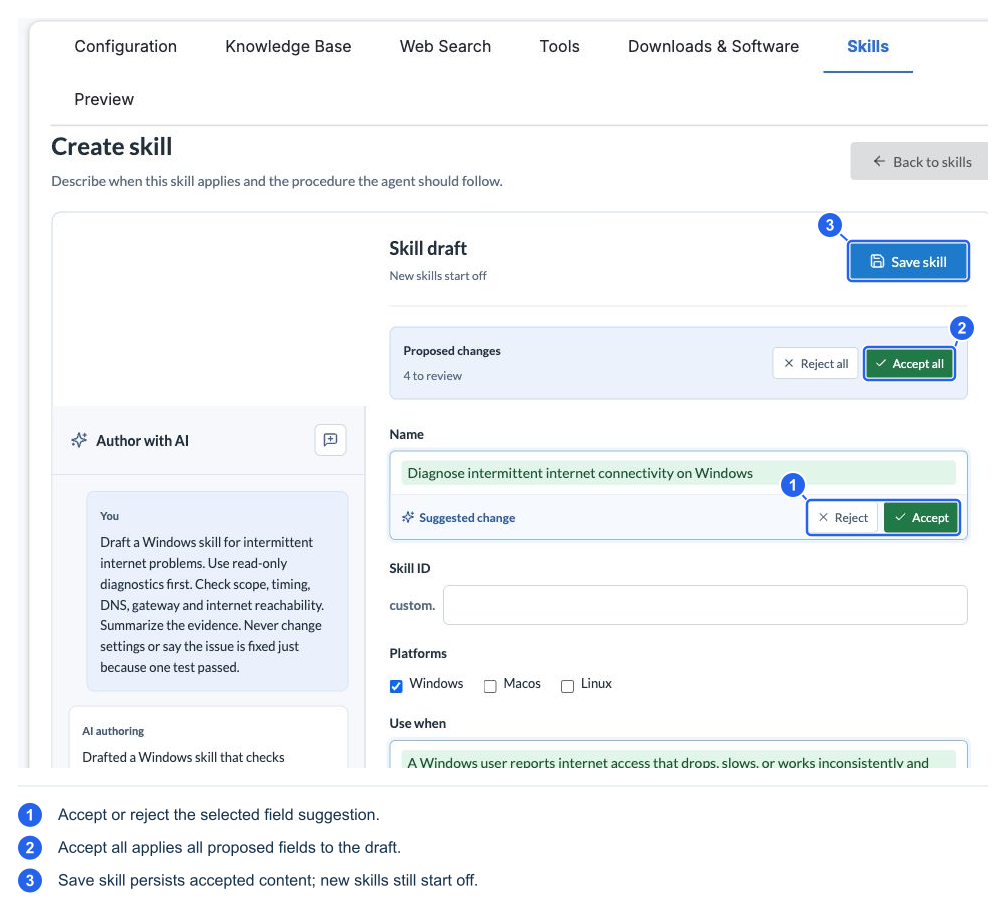
For a useful procedure, describe evidence to gather and how to interpret it. Include uncertainty and stop conditions. For example, an intermittent-network procedure should compare observations during failing and working periods rather than declare a fix after one successful ping. Avoid instructions that assume an unavailable tool or promise to skip organization approval.
Archive organization skills when retiring them; use Show archived skills to find retained entries. Restoring or cloning is different from editing a built-in procedure.