A plan groups the operations the agent proposes. Automatic plans show what is running. Plans that need approval wait for your decision.
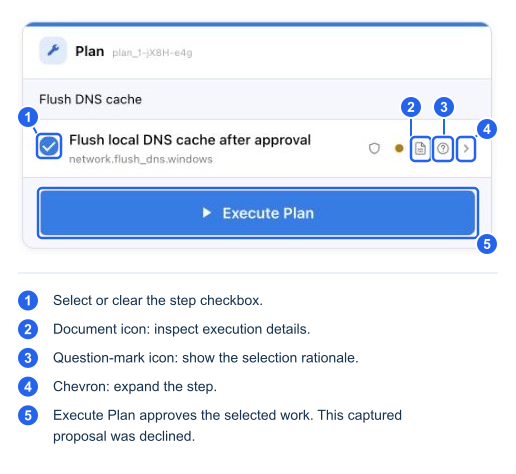
This DNS-flush proposal was captured for review and then declined. It was not executed.
- Read the objective and every proposed step.
- Expand a step to understand its operation and target.
- Use Why this tool? for the selection rationale.
- Use View execution details to inspect source and arguments when available.
- Check the steps you want to approve and uncheck those you want to omit.
- Select Execute Plan only after reviewing the selected steps and any warning acknowledgement.
If any operation in a proposed batch requires approval, the whole batch waits. Being in an administrator session does not remove this approval requirement. A disconnected device cannot execute a pending plan.
You can also respond in ordinary language:
| Your response | Expected effect |
|---|---|
| “No, skip that and investigate DNS instead.” | Declines the proposed approach and introduces the replacement work |
| “No” or “try something else” | Declines the approach; the agent asks for or develops another direction |
| “Yes” or “proceed” for an ordinary pending plan | Can approve the current proposal; review which proposal your reply addresses |
| A question in Ask mode | Explains the issue without approving or consuming the pending plan |
| A new device-work request | Puts unfinished work on hold while the new task is handled |
| “Continue” when work is on hold | Resumes the unfinished work when it remains available |
Ordinary plan cards do not need a separate Reject button: plain-language feedback or submitting no selected steps can reject the approach. Generated-code cards offer Cancel and a review modal with Don't run.
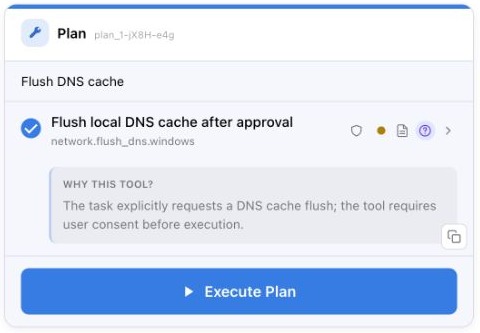
Why this tool? expands the selection rationale. It is an explanation of the choice, not independent proof that the operation is needed.
High-risk warning cards have an additional rule. If a software or driver card requires a warning acknowledgement, you must tick that card's acknowledgement. A typed “yes” does not supply it. Review the measured file, device, publisher, and warning details before approving.
Stopping a turn cancels further agent processing as far as the host can stop it. It does not roll back completed actions, and it does not guarantee that an already-dispatched native script or installer has stopped. Inspect its eventual result before repeating it.