There are three distinct setup decisions:
- Tools: decide which software/driver operations are available. The suites start off, including searches and inventories.
- Configuration → Tool Execution: keep High at Human-in-the-loop for these suites to be available.
- Downloads & Software: choose which sources and installer files can be considered and which exceptions the organization permits.
There is no additional category-level installation allowance on this page. Changing the download policy does not enable a disabled tool.
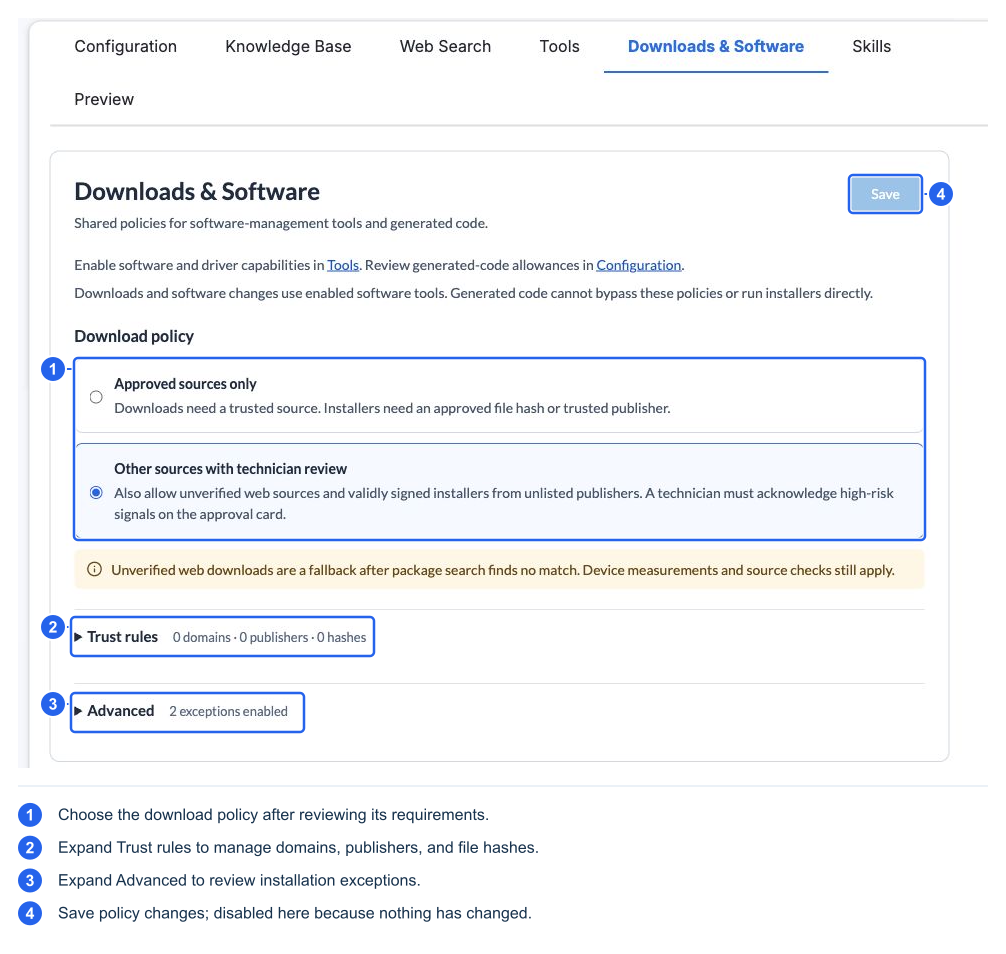
Choose a download policy
| Policy | What it permits |
|---|---|
| Approved sources only — default | Downloads need a trusted source; installation needs the approved hash/publisher evidence required by the workflow |
| Other sources with technician review | Also permits qualifying unverified web fallback and measured review of validly signed installers from unlisted publishers; warnings, product/source checks, and explicit acknowledgement still apply |
A search result alone does not make an arbitrary download eligible. The normal software path searches device/package sources first and can then use qualifying fallback for the requested product. A blocked enterprise package source is not the same thing as “no package found.”
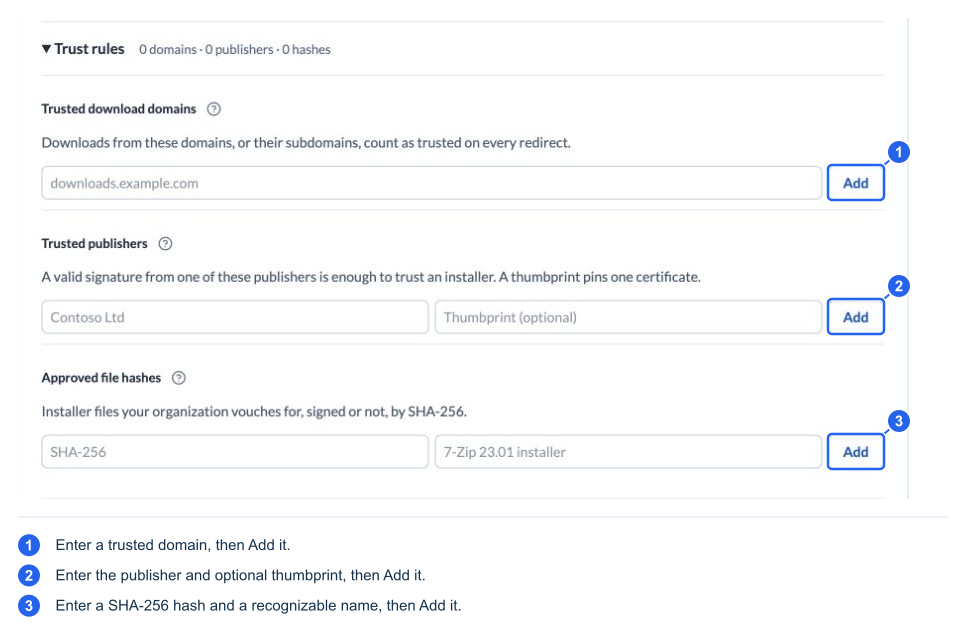
Set trust rules
| Rule | What it establishes | What it does not establish |
|---|---|---|
| Trusted download domains | Trust in a download host and its subdomains; redirect hosts are checked too | The contents of every file from that host are safe or approved |
| Trusted publishers | A valid signature from the named publisher; an optional certificate thumbprint pins a particular certificate | That the publisher's every product is suitable for this user |
| Approved file hashes | Approval of the exact SHA-256 file bytes, signed or unsigned | Approval of a later version or a file with different bytes; an installer can still need technician approval |
Use a narrow bare hostname for a domain rule. Publisher names should match measured signature identity. A pinned certificate can require an updated rule after renewal. A SHA-256 has 64 hexadecimal characters; obtain it from an independently trusted source or verified file. The hash Description is a friendly label, not part of matching.
An empty trust list adds no trust through that list; it does not necessarily block every other trusted route. Source trust and artifact trust are different checks. Review both on the approval card.
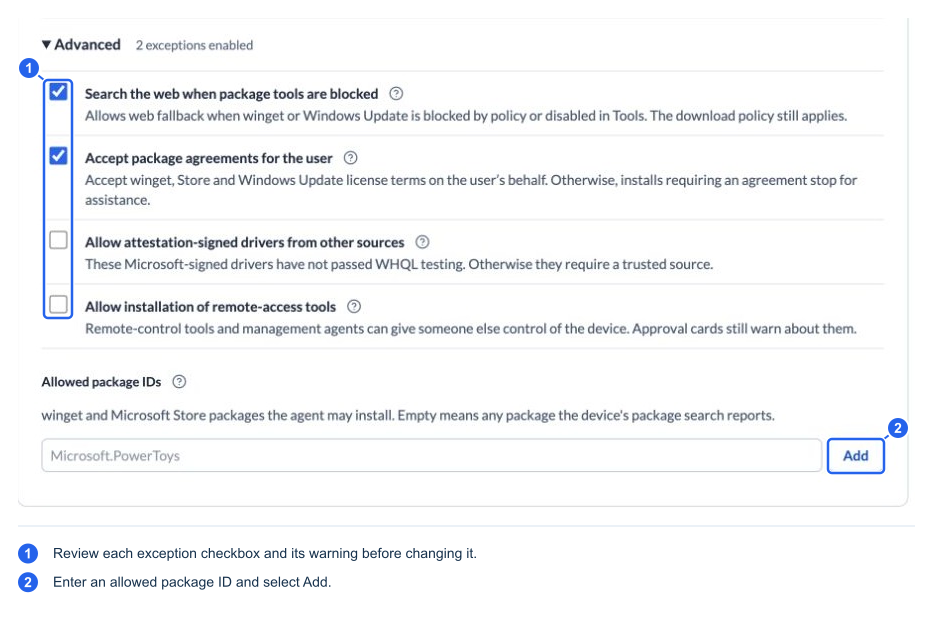
Review Advanced exceptions
| Setting | Default | Effect |
|---|---|---|
| Search the web when package tools are blocked | Off | Allows a web fallback route when winget/Windows Update is blocked or disabled; it does not change device policy, enable those tools, or waive download policy |
| Accept package agreements for the user | Off | Allows enabled tools to accept applicable package/Store/Windows Update license terms. With it off, operations needing agreement acceptance stop for assistance; install approval remains separate |
| Allow attestation-signed drivers from other sources | Off | Permits qualifying Microsoft-attestation-signed packages from otherwise unverified sources; these have not passed WHQL testing. Unsigned drivers and refused classes remain blocked |
| Allow installation of remote-access tools | Off | Permits otherwise-refused remote-control/RMM product installation through the managed workflow; warning and approval checks remain |
| Allowed package IDs | Empty | A nonempty list restricts winget/Store installs to the listed exact IDs. Empty permits eligible packages returned by the device's package search; it does not enable tools or approve arbitrary EXE/MSI files |
Save the page after changing policy or rules. These settings affect what operations the agent may propose and dispatch; they are not instructions to perform an installation immediately.
What a technician should expect
The agent can search eligible package sources, ask you to resolve ambiguous products, and inspect an installer before proposing execution. An existing local installer is first found and staged as a measured copy; the stage operation does not run it. Download-only steps can be automatic when they qualify; installation remains a distinct approval.
Installer review can include the origin, filename/type, SHA-256, signer/signature status, malware-scan result, intended target, and warnings. The file is re-measured before elevated execution. Changed files, mismatched hashes/publishers, unsafe archives, or unsupported installers can be refused.
| Card situation | Expected review |
|---|---|
| Approved file/hash evidence | The card can show corroborating trust details rather than treating the discovery route alone as a danger |
| Valid verified publisher plus suitable scan/source evidence | Disclosures and ordinary review can still apply |
| Remaining high-risk or uncorroborated unverified evidence | Danger-tier review requires the card's explicit warning acknowledgement; typing “yes” is insufficient |
The system tracks where governed values came from. Copying a URL or publisher that the agent first supplied and pasting it back does not turn it into independently technician-originated trust. An attachment also does not automatically become an approved software source. Resolve uncertain provenance through the intended catalog, measured review, or organization trust workflow.
Driver changes additionally bind the selected update/package to the inventoried device and apply a device-class policy. Network, boot/storage, input, security/firmware, and other session-critical classes can be refused even if the operator wants the change. Some other classes require warnings. A trusted signature is not permission to bypass device-class restrictions.
Software/driver installation tools do not reboot the device automatically. A reported reboot requirement is a separate decision using the normal reboot/reconnect workflow. A timeout can leave an installer still running or its outcome unknown; inspect and reconcile that operation before dispatching another install.